What a key is#
An API key is a private credential bound to exactly one project. The key identifies
who you are; the bound project is what pays for every call the key makes. Keys look
like aig_…, are stored only as hashes, and the secret is shown once at creation.
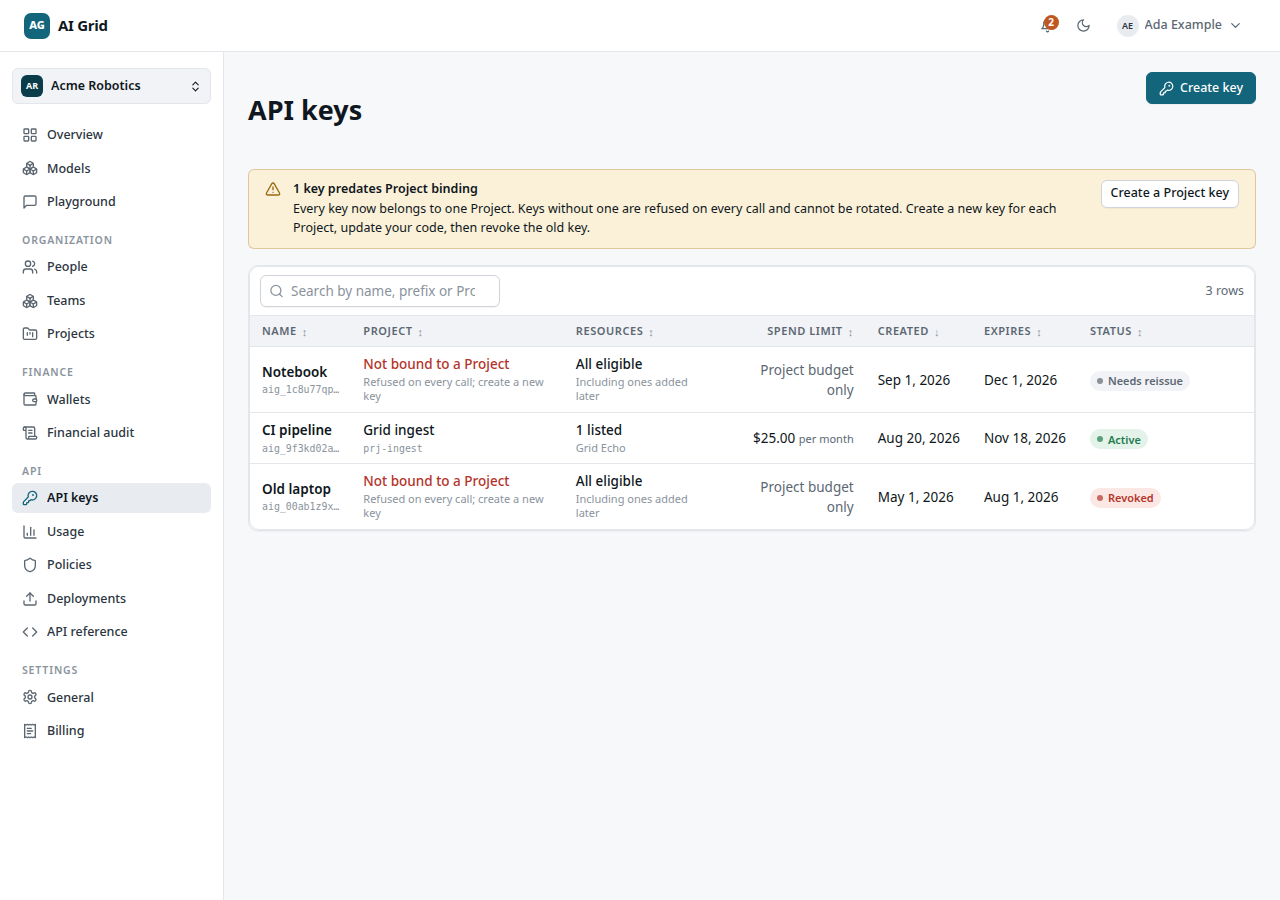
Open API keys under the API group in the left rail. The list is private to you — other members never see your keys.
| Column | Meaning |
|---|---|
| Name | The label you gave the key |
| Project | Its bound project — the charging context |
| Resources | All eligible or N listed |
| Spend limit | Project budget only, or a limit with a reset period |
| Created / Expires | Issued date and expiry date |
| Status | Normal, Needs reissue or Rotated |
Create a key#
Click Create key and fill the form:
- Project — pick the project the key belongs to. Only projects you may issue a key for appear.
- Name — a label you recognize later.
- Expires in — 1 to 365 days; 90 days is the default.
- Allowed resources — All eligible resources (everything the project can call today and anything it becomes able to call later), or Only the resources I list to pin an explicit, non-empty list.
- Spending limit + Resets — optional per-key cap with a lifetime / daily / weekly / monthly reset, on top of the project budget.
Click Create key. A Copy your new key modal opens — the secret is Shown once. Click Copy, store it somewhere safe, then I have saved it. If you close without copying, create a new key; the secret cannot be retrieved.
Who may create a key#
You need all three, re-checked on every call, not only at issue time:
- an active membership of the organization,
- an active grant on the project's owning team (Team Owner or Team Member),
- an active project grant with a consumption right (Project Owner or Project Consumer).
Organization administration alone does not substitute. If the Project picker is empty, you hold no consumption grant yet — ask an Owner or Administrator to grant you access on the project's Members tab.
Rotate or revoke#
Open the row menu on a key:
- Rotate key — issues a replacement secret with the same project, access list, spending limit and expiry span, and revokes the old key. Update your deployments immediately; the old secret stops working at once.
- Revoke key — optional reason, then the key stops working on the next call.
Lost the secret? Rotation is the recovery path — it mints a new secret you can copy.
Use the key#
Point your SDK at the grid with the same origin the console runs on, path /v1:
curl $AIGRID_ORIGIN/v1/chat/completions \
  -H "Authorization: Bearer $AIGRID_API_KEY" \
  -H "Content-Type: application/json" \
  -d '{"model": "<product id>", "messages": [{"role": "user", "content": "Hello"}]}'
The key already names its project, so no project header is needed. A selector that
repeats the bound project is accepted; one that differs is refused with
403 project_mismatch. GET /v1/models with the same key lists exactly what it can
call — see Usage and call records for what happens to each call.