Open the playground#
Open Playground in the left rail. It runs on your signed-in session — the browser never stores an API key — and it goes through the same admission, reservation and charging path as the public API. Calls here are real metered calls against the project wallet, not a free preview.
You need a project with eligible resources and a consumption right (Project Owner or Project Consumer). Without one, the model list is empty — an Owner or Administrator must assign a product to the project and grant you access first.
Choose what pays and what answers#
- Project that pays — pick the project in the selector. Until you do, the composer shows Select a Project first and sending is blocked.
- Add model — open the picker (or press ⌘J / Ctrl+J) and choose what answers. It lists only what this project can actually call, grouped as Chat models, Media models and Sandbox products, with a search box and a count of what is available; a row's tooltip shows what one answer costs. Arrow keys walk the rows. Each choice you make joins the picker as a removable chip. The composer placeholder Choose at least one model first reminds you if none is selected.
- Write your prompt in the Write a prompt composer and click Send, or Send to N models to compare.
Your prompt goes to N models at once; each reply has its own request, reservation and charge.
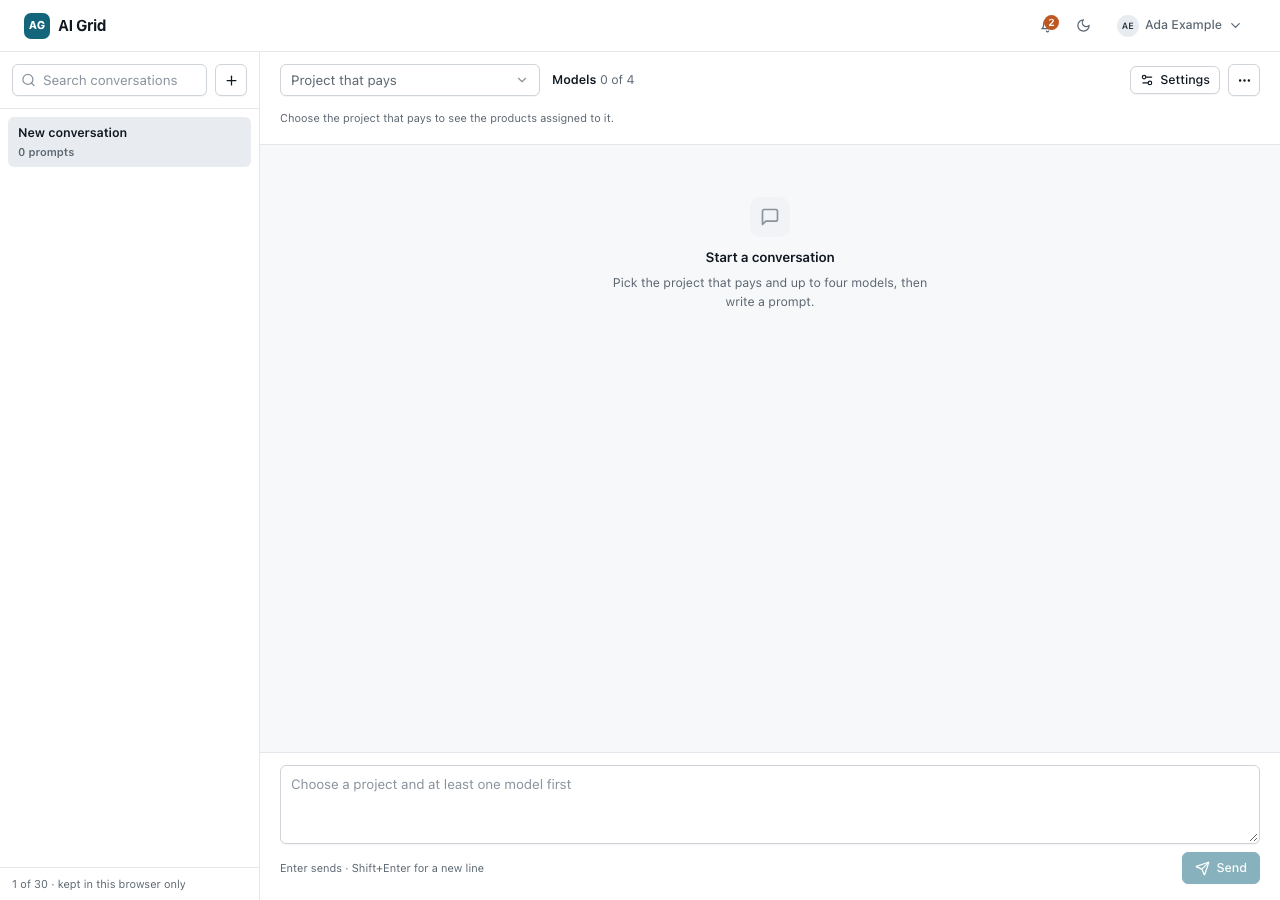
Up to four chat models can be compared side by side; at the cap the picker says so and asks you to remove one first. A media model or a sandbox product takes the composer alone, so choosing one replaces the current selection. Each model sees only its own prior replies, and a failure in one reply leaves the others untouched — a prompt that failed outright is not kept in the thread.
Replies stream in as they are produced. Each reply shows its charge, token counts and latency, with per-reply actions:
- Copy — copy the reply text.
- Regenerate — a fresh answer. This is a new call with a new reservation and a new charge.
- Retry delivery — re-delivers the same request under its idempotency key. No second reservation or charge when the original answer can be replayed.
- Delete — removes the reply from the conversation.
Unknown outcomes (a reply that fails ambiguously) are reconciled automatically against the usage record, so the charge you see settles to what actually happened.
Conversation settings#
Click Conversation settings to open the drawer:
- System prompt — prepended to the conversation.
- Temperature — a slider for sampling randomness.
- Max tokens — cap on each reply's output.
Conversations#
The left panel keeps up to 30 conversations, stored in your browser (not on the server), with Search conversations and New conversation. Clearing browser storage loses them; anything you want to keep belongs in code with an API key.
Project links#
From a project record you can click Open playground — the playground opens with that project pre-selected. The model picker lists only the products actively assigned to the selected project (in a personal workspace, everything published is callable), so an empty picker means the project has nothing assigned yet. Every call appears in usage — see Usage and call records.